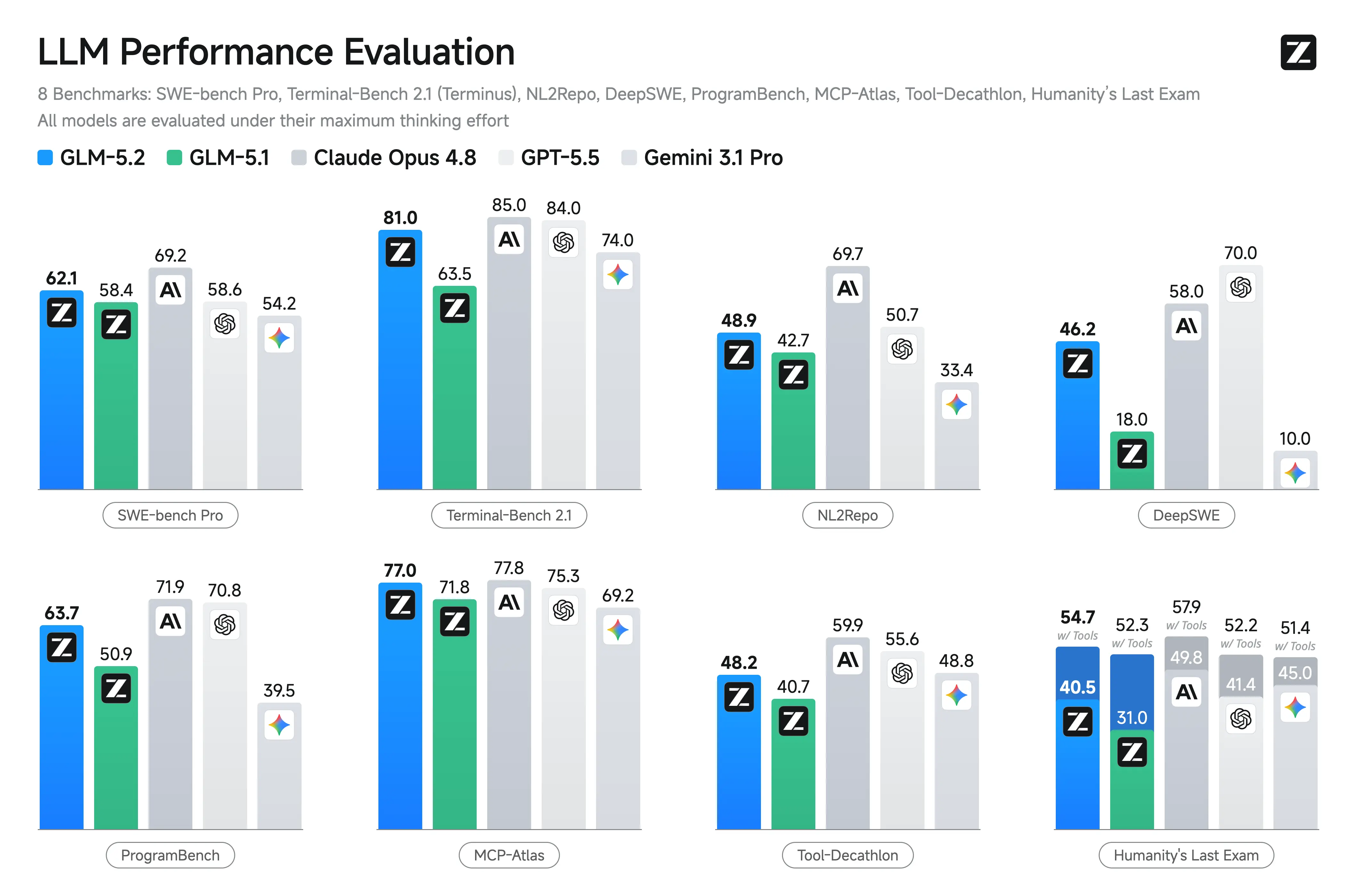
What GLM-5.2 is
GLM-5.2 is Z.ai's flagship model for long-horizon engineering, coding-agent workflows, technical reasoning, tool use, and sustained multi-step tasks. It is designed for work that stretches across large project context, requirements, implementation details, debugging loops, and deployment planning.
The Terminal Glass cloud target is
glm-5.2:cloud, with text input, tool support, thinking support, high cloud usage, and a 976K listed context window on Ollama. Z.ai also describes a usable 1M-token context for sustained coding-agent trajectories and configurable thinking effort levels (High and Max). It is best treated as a serious cloud evaluation lane for long-context engineering work, not as a low-cost default chat model.
The Terminal Glass trade-off
Terminal Glass gives users a shared OpenWebUI interface, local RAG organization, and a familiar Ollama workflow while routing GLM-5.2 inference to Ollama Cloud. This lets a small server, NUC, or cloud VM provide access to a large long-horizon model without hosting the model locally.
Honest reality: prompts, source-code snippets, documents, RAG passages, tool outputs, and conversation context sent to
glm-5.2:cloud leave your infrastructure. You also accept recurring cloud usage costs, network latency, and less control over strict reproducibility. Choose NoCloudGPT Air Gapped when privacy, cost predictability, latency control, or controlled model behavior matters more than cloud convenience.
What about the video card?
This is the question most buyers are actually trying to answer.
Running these models without a proper GPU usually means falling back to CPU only. This works for very light use, but it becomes extremely slow for normal workloads. Many people discover this the hard way after spinning up a cloud server that ends up being too expensive or too slow.
Some teams want to avoid dealing with GPUs altogether. For them, Terminal Glass Cloud is usually the simpler option -- you get capable models through a familiar OpenWebUI interface without having to select, size, or manage video cards.
Other teams prefer to run on infrastructure they control. In that case, they typically choose a GPU-based instance (on AWS Lightsail, Digital Ocean, or their own servers) and install NoCloudGPT on it. Because these models are designed to run with local Ollama, you become responsible for selecting and managing the GPU.
Some organizations need everything to stay fully inside their own environment from day one. For those teams, a NoCloudGPT Air Gapped deployment on their own hardware is the right approach.
There isn’t a single right answer. The right answer depends on your constraints around cost, privacy, compliance, latency, and long-term ownership.
Who This Model Family is For
👤 Personal Use
Useful for advanced technical users who want help with large coding projects, long documents, complex debugging, research planning, and multi-step engineering work without maintaining high-end inference hardware. Avoid credentials, private journals, financial records, sensitive code, and personal documents.
🏢 Business / Team Use
A strong fit for teams evaluating long-context engineering assistants, developer onboarding, internal documentation, implementation planning, technical support, and project-scale coding agents. Use NoCloudGPT Private Instances for proprietary repositories, regulated data, confidential client material, or work that must remain inside your environment.
⚙️ Developer & Technical Use
Well suited for long-running coding tasks, tool-calling prototypes, repository analysis, implementation planning, performance optimization, complex debugging, and agentic engineering workflows. Use higher thinking effort only when the problem justifies added latency and cost.
🔬 Data Science & Research Use
Practical for public datasets, benchmark exploration, long-context literature review, technical report synthesis, automated research, and post-training workflow experiments. For reproducible work, store prompts, model tags, tool logs, inputs, outputs, repository snapshots, and evaluation scripts.
How Terminal Glass Works with This Model
Users work in OpenWebUI on the Terminal Glass host. The host keeps the shared interface, accounts, project conventions, and local RAG collections close to your environment. When a user sends a GLM-5.2 request, Ollama routes inference to Ollama Cloud and streams the response back.
Cloud access requires an Ollama account (ollama signin)
on the Terminal Glass machine. GLM-5.2 is rated high usage on Ollama -- expect higher per-request cost than smaller cloud models, especially with long 976K contexts, reasoning-enabled prompts, and multi-round tool calls.
ollama signin
ollama run glm-5.2:cloud
What leaves your infrastructure: prompt text, source-code excerpts, documents, RAG-retrieved passages, tool outputs, and conversation context sent for model processing. Latency includes network round-trips -- acceptable for chat and agentic tasks, more noticeable in rapid automation. Cost is usage-based and can accumulate with heavy agentic sessions or shared team use.
Honest Guidance: When to Choose a Different Path
- Choose NoCloudGPT Private Instances when prompts, documents, source code, RAG content, or tool outputs must stay inside infrastructure you control.
- Choose a smaller model for routine drafting, basic Q&A, low-cost support, or simple coding workflows where GLM-5.2 is more model than the task requires.
- Choose local deployment if repeated high-volume use makes recurring cloud spend less attractive than owned inference infrastructure.
- Be careful with agent automation -- coding agents, shell commands, long-running tasks, repository edits, and tool workflows still need permissions, logs, validation, tests, and rollback practices.
- Model-version pinning or audit-grade reproducibility -- A pinned local deployment on NoCloudGPT Private Instances provides more control than a cloud-only tag.
Recommended Terminal Glass Deployment
| Variant / Tag | Recommended For | Notes | |
|---|---|---|---|
| glm-5.2:cloud | Long-horizon engineering, coding agents, complex debugging, automated research, project-scale technical work | 976K listed context, text only, thinking and tools, high usage tier. Only verified GLM-5.2 tag on Ollama. Configurable thinking effort (High and Max) for harder agentic tasks. | Get quote → |
Ollama currently lists GLM-5.2 as a cloud-only family -- there is no separate local tag on the catalog page. Confirm availability at ollama.com/library/glm-5.2 before deployment.
Licensing & Access
GLM-5.2 is listed with an MIT open-source license. Ollama Cloud access requires an Ollama account and is subject to Ollama's current pricing, availability, and terms. Terminal Glass does not change upstream model licensing or cloud-provider obligations.
Official catalog: ollama.com/library/glm-5.2
Review Z.ai and Ollama terms before using GLM-5.2 Cloud with proprietary repositories, customer data, regulated documents, production agents, long-running automation, or externally delivered services.
What Terminal Glass adds
Terminal Glass adds the shared interface, local RAG structure, user workflow, and cost controls around GLM-5.2 Cloud. It is a practical way to evaluate long-horizon engineering and coding-agent workflows with lower local hardware requirements.
We help you size the local host and choose the right cloud variant for your team.